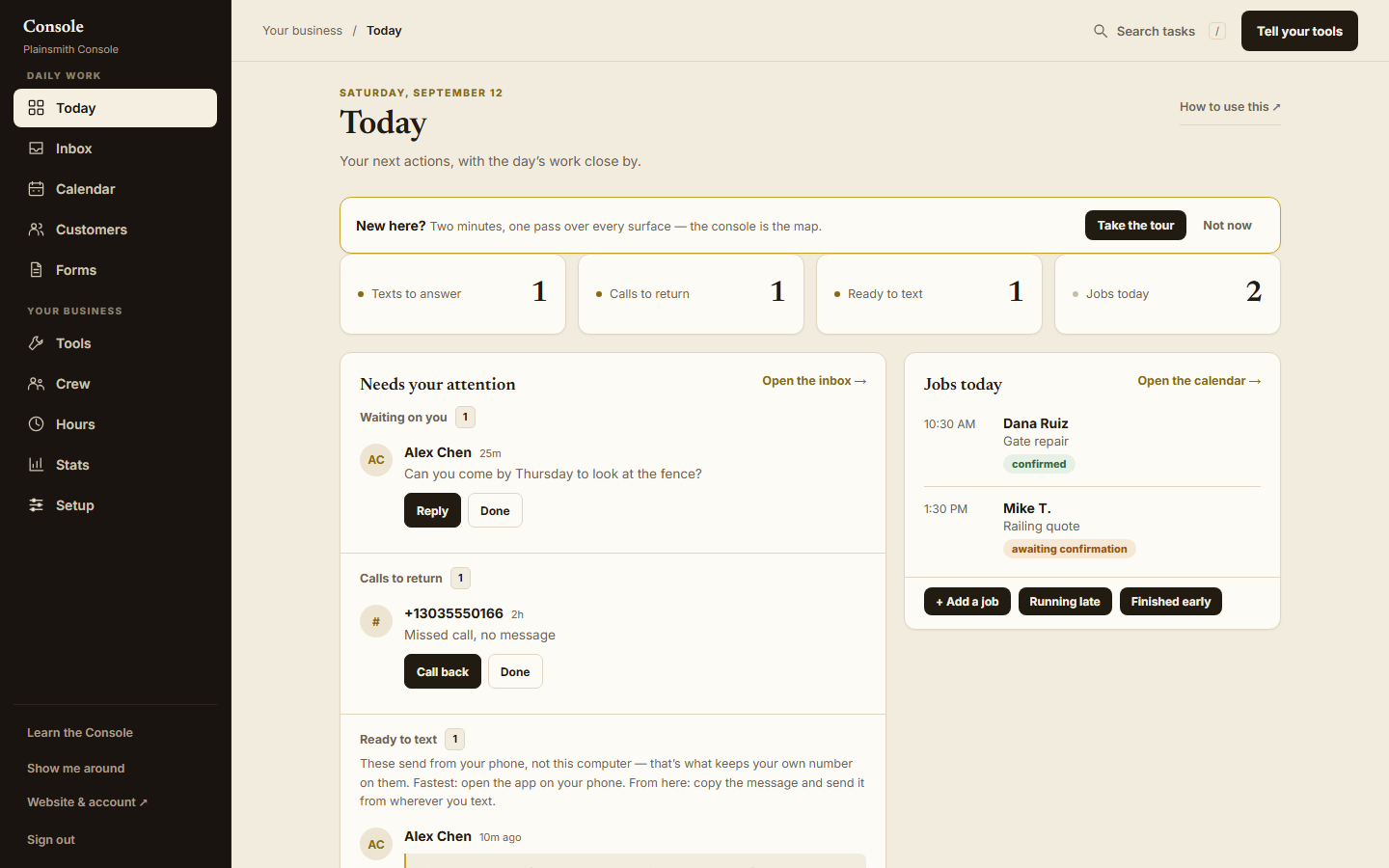
Today opens on who’s waiting.
A list of everything the app can do is a bad place to start a morning. So the Today screen now opens on four questions with a number beside each: which texts need an answer, who called, what’s ready to send, and what’s booked today. Under the numbers are the people: the customer’s name, what they said, and the buttons that deal with it.
The tool library is still there. You just don’t have to read it to find a message.
The menu, the Inbox and two buttons.
The first version looked fine in a wide window. Narrow the window and the left menu was clipped off the bottom, with no way to reach the last items. We gave the menu its own scrolling space and then checked every screen at desktop and phone widths, which we should have done first.
The Inbox had a subtler one. Open a conversation from lower down the list and the new screen stayed scrolled halfway down, so the conversation loaded with its beginning out of sight. Now a different conversation opens at the top, and a background refresh of the one you’re already reading keeps your place.
And on a call that needs returning, “Call back” and “Done” sat at different heights. They’re on one line now, so a row reads as one customer and the things you can do about them.
The error that blamed the wrong thing.
On a job, there’s a button that texts the customer a link so they can add photos or files to the job from their phone. In the review copy of the Console, pressing it produced a connection warning, which sent us looking in the wrong place: was the tool switched off, or did it only work from a phone?
Neither. The review copy simply couldn’t send a text. The working Console does one of two things and tells you which: if your account can send texts, it texts the link; if not, it copies the link to your clipboard so you can send it from your own phone. Either way the button says what it did.
The lesson we took: an error has to name the action that failed. A warning about a connection, on a button about a link, sends the person who pressed it off to fix the wrong thing.
Setup, now that the tools are in the plan.
The workflow tools come with the website plan now, so the Console no longer has a shelf where you bought them. That took a screen away and left a question behind: a tool can be yours and still need your hours, your wording or a phone-provider connection before it’s switched on.
Today you set those on the Setup and Tools screens yourself. The next piece of work is a guided setup that starts from what you already told us in the website questionnaire, shows you an example before a tool goes on, and leaves the business decisions and the provider sign-ins with you.
What’s done and what isn’t.
Done, and live: when a customer fills in the contact form on your site, the inquiry service now records each attempt to deliver it to your Console and retries a delivery that failed. The Console receives the inquiry’s email address and any photos they attached. In Forms, you review a document before it’s created and its link is queued, and going back to edit keeps your draft. And each contact’s permission to be texted or emailed is recorded by purpose and by channel, so a tool that sends marketing texts checks that record before it sends.
Not done: the guided setup above, and the wording of each tool’s messages, which we’re rewriting one tool at a time. A reply also needs to decide whether it’s going out by email or by text before it’s composed, so its instructions match where it lands. We haven’t yet run a whole customer journey through all of this at once, including a delivery that fails and gets retried, and until we have, the retry is built rather than proven. We’ll write that up when it’s done.